Discuz报common_member_count’ is marked as crashed and should be repaired
解决手段:使用phpmyadmin的表修改功能。网上有说去命令行执行mysql命令的,但还是感觉采用phpmyadmin进行操作比较直观。

Discuz报common_member_count’ is marked as crashed and should be repaired
解决手段:使用phpmyadmin的表修改功能。网上有说去命令行执行mysql命令的,但还是感觉采用phpmyadmin进行操作比较直观。
 protected void Button1_Click(object sender, EventArgs e)
        {
            // 调用代码
            string[] cmd = new string[] { "appcmd recycle apppool /apppool.name: DQSite(8000)" };
            //MessageBox.Show(Cmd(cmd));
            TextBox1.Text = Cmd(cmd);
            CloseProcess("cmd.exe");
        }

        /// <summary>
        /// 运行CMD命令
        /// </summary>
        /// <param name="cmd">命令</param>
        /// <returns></returns>
        public static string Cmd(string[] cmd)
        {
            Process p = new Process();
            p.StartInfo.FileName = "cmd.exe";
            p.StartInfo.UseShellExecute = false;
            p.StartInfo.RedirectStandardInput = true;
            p.StartInfo.RedirectStandardOutput = true;
            p.StartInfo.RedirectStandardError = true;
            p.StartInfo.CreateNoWindow = true;
            p.Start();
            p.StandardInput.AutoFlush = true;
            for (int i = 0; i < cmd.Length; i++)
            {
                p.StandardInput.WriteLine(cmd[i].ToString());
            }
            p.StandardInput.WriteLine("exit");
            string strRst = p.StandardOutput.ReadToEnd();
            p.WaitForExit();
            p.Close();
            return strRst;
        }

        /// <summary>
        /// 关闭进程
        /// </summary>
        /// <param name="ProcName">进程名称</param>
        /// <returns></returns>
        public static bool CloseProcess(string ProcName)
        {
            bool result = false;
            System.Collections.ArrayList procList = new System.Collections.ArrayList();
            string tempName = "";
            int begpos;
            int endpos;
            foreach (System.Diagnostics.Process thisProc in System.Diagnostics.Process.GetProcesses())
            {
                tempName = thisProc.ToString();
                begpos = tempName.IndexOf("(") + 1;
                endpos = tempName.IndexOf(")");
                tempName = tempName.Substring(begpos, endpos - begpos);
                procList.Add(tempName);
                if (tempName == ProcName)
                {
                    if (!thisProc.CloseMainWindow())
                        thisProc.Kill(); // 当发送关闭窗口命令无效时强行结束进程
                    result = true;
                }
            }
            return result;
        }
使用网页形式来刷新应用程序池可以防止多人抢线远程登陆,也更方便,可以在一个页面上完成刷新,测试
扩展应用:
用于以web方式管理站点,可开通、删除、设置,做主机管理软件
参考:
http://www.cnblogs.com/njnudt/archive/2009/12/03/1616135.html
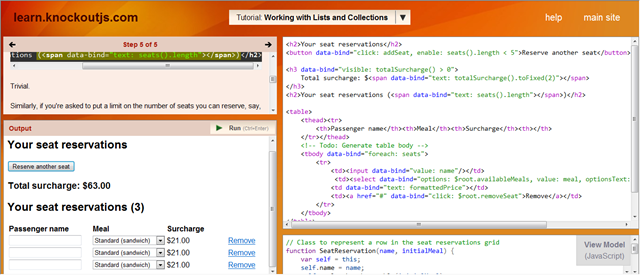
http://learn.knockoutjs.com/#/?tutorial=intro 直接在线学习
<!– This is a *view* – HTML markup that defines the appearance of your UI –>
<p>First name: <strong data-bind=”text: firstName”></strong></p>
<p>Last name: <strong data-bind=”text: lastName”></strong></p>
<p>Full name: <strong data-bind=”text: fullName”></strong></p>
<p>First name: <input data-bind=”value: firstName”/></p>
<p>Last name: <input data-bind=”value: lastName”/></p>
// This is a simple *viewmodel* – JavaScript that defines the data and behavior of your UI
function AppViewModel() {
this.firstName = ko.observable(“Bert”);
this.lastName = ko.observable(“Bertington2121″);
this.fullName = ko.computed(function(){
return this.firstName()+” “+ this.lastName();
},this);
}
// Activates knockout.js
ko.applyBindings(new AppViewModel());
knockoutjs 练习界面:
客户端技术:
http://jquery.com/ html对象操作
http://knockoutjs.com/ 数据绑定
https://github.com/ericmbarnard/Knockout-Validation 数据验证
http://knockoutjs.com/documentation/plugins-mapping.html 将服务端的json数据映射到客户端knockout对象
http://www.requirejs.org/ 模块化加载器,按需加载,模块化管理脚本
http://www.json.org/js.html 低版本IE json 的补丁
http://millermedeiros.github.io/crossroads.js/ 客户端url解析管理
https://github.com/millermedeiros/hasher 客户端url hash管理,hasher依赖这个库http://millermedeiros.github.io/js-signals/
https://github.com/federico-lox/pubsub.js javascript消息通讯管理,利用这个来实现模块间通讯
框架方面可以参考这个:http://durandaljs.com/ crossroad,hasher,signals,pubsub等脚本
服务端技术:
http://www.asp.net/web-api webapi
1.创建完MVC4的项目

2.选择互联网应用模板

3.打开Google帐号登陆功能 去掉这句OAuthWebSecurity.RegisterGoogleClient();的注释

4.查看效果

评论:这也太神速了。连申请接入程度的key都不需要!Google V5
//在C++中 结构体和类的区别只有 :结构体缺省情况下是public属性,类缺省情况下是private
#include “” 即在程序文件查找又在系统文件查找
#include <>只在系统文件查找
#ifndef xxxxx
#define xxxxx
class Point
#enddif
#ifndef xxxxx
#define xxxxx
class Point
#enddif
可防止重复定义
转自:
http://blog.163.com/abc1_11/blog/static/21711932007763451454/